🏢 Private company knowledge search for UK small businesses

Search all your company knowledge in seconds — not hours

Stop wasting time hunting through files, emails, and shared drives. Ask questions across all your documents in natural language. Get answers in seconds with the exact source and page number — no guessing.

£350 to install (remote, includes 30-day support) + £2–5/month to run. No monthly subscription. See how it compares
Book a free demo with your documents ▶ See it in action (2 min)
Your documents never leave your server Answers in seconds with source and page cited Installed in one day

Founded by James Weld · York, England · hello@weldai.uk

Smith & Jones Solicitors — Document Assistant
🔒 Private · On your server
What is our client data retention policy?
Client data must be retained for a minimum of 7 years following the end of the matter, in accordance with SRA requirements. Electronic files should be archived to the secure server and physical files to the basement archive.
📄 Data Policy v3.2.pdf · p.4 ⏱ 1.8s · 3 sources
Patel matter — what are the agreed disbursement terms?
Disbursements for the Patel matter are capped at £2,500 without prior written approval. Items above this threshold require sign-off from the supervising partner before they are incurred.
📄 Patel/Engagement Letter.pdf · p.2 ⏱ 1.9s · 2 sources · 📁 scoped to Patel
Real product · Real answers

See it working with real documents

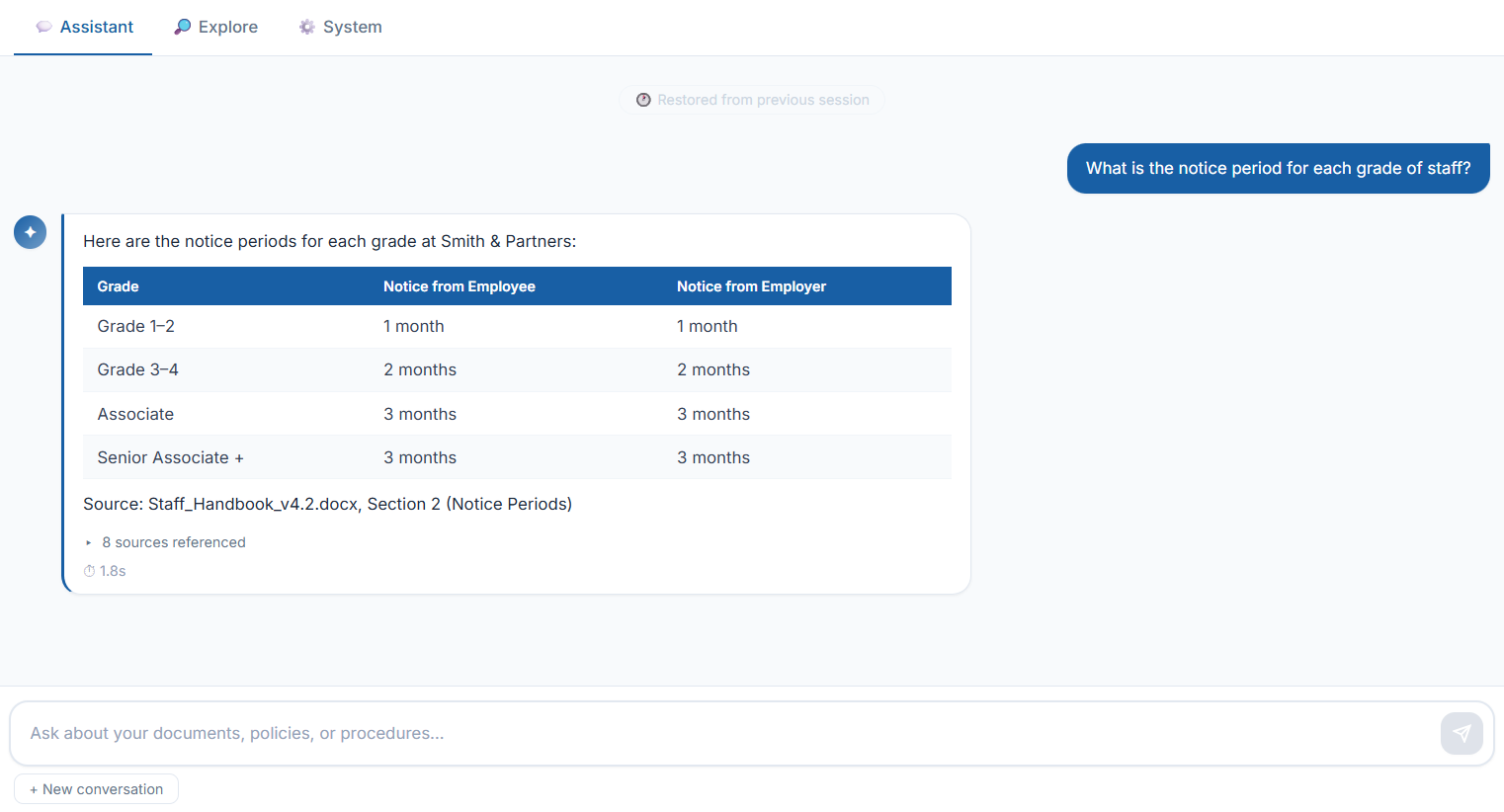
A real query against a real company policy document — notice the formatted table and exact source citation.

Weld AI answering a question about notice periods, showing a formatted table with source citation

Answer includes formatted table and exact source — Staff_Handbook_v4.2.docx

Staff waste hours finding information that already exists

Document-heavy teams lose 20–30 minutes per person per day searching for things they know exist. For a 10-person office that's £25,000 a year in lost time alone.

🔍

Time wasted searching costs real money

Based on 10 staff × 20 min/day × 250 working days × £20/hour. Most firms pay back the installation cost in the first week.

🔁

Expert knowledge walks out the door

When experienced staff leave, their knowledge goes with them. Weld AI captures it in your documents and makes it available to everyone — permanently.

😟

Cloud AI tools aren't safe for confidential documents

ChatGPT and Copilot would help, but you can't upload client contracts, financial data, or HR files to a third-party cloud service.

Up and running in a single day

No IT project. No engineer visit. Minimal IT involvement — we handle the setup. Up and running the same day.

1

We install on your server

We install remotely over a screen-share call on your existing Windows or Linux server. Typically under an hour.

2

Load your documents

Copy your policies, contracts, manuals, and reports into a shared folder. PDF, Word, Excel, PowerPoint — any format.

3

Index once, search forever

Click one button and the AI reads all your documents. Smart Update re-indexes only what changed when you add new files.

4

Ask anything, get answers

Open a browser on any device. Ask follow-up questions — the AI remembers the conversation and understands context.

🖥️ Check your system before booking
Find out which install type suits your setup — Windows PC, Windows Server, or Linux. Takes 30 seconds.
Run System Check →

Built for real business use

Every feature designed to be used daily by non-technical staff — no training required.

📝

Whole-document summaries New

Ask for a summary of any document and get a synthesised answer drawn from across the whole file — not just the opening pages. The answer shows you how much of the document was covered.

📁

Folder-aware search New

Mention a client, matter, or project folder by name in your question and Weld AI scopes the search to just those documents — built for firms that organise work by matter or client.

📚

Source citations with page numbers

Every answer includes the exact document and page number. Staff can verify the information and stay compliant.

💬

Conversation memory

Ask follow-up questions naturally. "Can you give me more detail on the first one?" — the AI understands context from the entire conversation, not just the last message.

🕐

Persistent chat history

Conversation history saved to your server database. Reload the page and your previous conversation is restored — pick up exactly where you left off.

🔎

Direct document search

Search your document index directly to find specific passages. Click any result to open the source document in your browser.

🔄

Smart document updates

Add new documents any time. Smart Update only re-indexes what changed — seconds, not minutes.

🎨

Branded with your company name

Your company name, colours, and tagline. Resizable sidebar, clean modern interface. Looks like your own product.

Designed with data privacy at its core

Your documents never leave your server. Only short, relevant text excerpts are sent to Claude to generate each answer.

🗄️

Documents stay on your server — always

Your files are never uploaded anywhere. Only the question you ask and the most relevant text excerpts are sent to Claude. Access to the system is over HTTPS with SSL encryption end-to-end.

🤖

Powered by Anthropic's Claude

Built on the Claude API — SOC 2 Type II certified, with terms of service that explicitly prohibit using your queries to train AI models. Queries are processed and discarded.

Built for company knowledge — not general AI

General AI tools like ChatGPT are trained on the world's information. Weld AI knows only your company's documents — giving your team specific, accurate answers they can trust.

Feature🏢 Weld AIGeneral AI Tools
Documents stay on your server✓ Always✗ Uploaded to cloud
Answer quality✓ Excellent (Claude)~ Good (generic)
Knows your company documents✓ Your docs only~ Requires setup
Folder-aware search by client or matter✓ Built in✗ Not available
Whole-document summaries✓ With coverage shown~ Context-window limited
Source citations with page numbers✓ Every answer~ Sometimes
Conversation memory✓ Full history saved~ Limited
No per-user monthly fees✓ Small API cost only✗ Per user/month
Branded with your company name✓ Fully branded✗ Generic UI

Built for businesses with lots of documents

If your team wastes time searching through files, policies, contracts, or manuals — Weld AI gives them instant answers.

🏛️ Accountancy practices ⚖️ Solicitors & legal firms 👥 HR consultancies 🏥 Healthcare practices 🔧 Engineering firms 📊 Insurance brokers 🏗️ Construction companies 🎓 Training providers

Frequently asked questions

Everything you need to know before booking a demo.

Do my documents leave my server?

No. Your documents remain on your server at all times. No full document uploads — ever. Only the question you ask and a few relevant paragraphs are sent to the AI to generate an answer. Everything else stays on your infrastructure.

What servers does it run on?

Weld AI supports four install configurations:

  • Windows PC or Workstation — Windows 10 (21H2+) or Windows 11, 8GB RAM minimum, WSL2 enabled by IT in advance (one PowerShell command). Most common for small firms.
  • Windows Server + Ubuntu VM — recommended for servers. A small Linux virtual machine runs inside your Windows Server via Hyper-V. Full network share support.
  • Linux Server — Ubuntu 22.04 or Debian 12. Simplest install, full network share support.
  • Windows Server Direct — alternative only, requires complex WSL2 setup. Ubuntu VM approach preferred.
→ Full requirements, install types and IT checklist on the System Check page
→ IT team? Step-by-step setup instructions in the IT Setup Guide
What's the install process like, and do we need IT staff?

Usually under one hour, remote over a Teams or Zoom screen-share. No engineer visit, no separate IT project. In most cases your team can start asking questions the same day. Day-to-day use needs no technical skill — staff open a browser and type a question, and adding new documents is just copying a file into a folder and clicking Refresh.

What document formats does it support?

PDF, Word (.docx, .doc), PowerPoint (.pptx), Excel (.xlsx, .csv), and plain text files. Most business documents are supported out of the box.

What happens when I add new documents?

Copy the file into your documents folder and click Refresh in the app. Only new or changed files are re-indexed — the process takes seconds for most documents.

How much does it cost to run?

Installation is from £350 (remote, includes 30 days support). The only ongoing cost is the AI usage — typically £2–5 per month for a small business, paid directly to the AI provider. No monthly subscription to Weld AI.

Where can our documents live? OneDrive, network drives, file servers?

Local drives (C:, D:, E:, USB) work as long as they're connected at startup.

OneDrive or SharePoint synced to the PC works, provided the documents folder is set to "Always keep on this device" in File Explorer. Cloud-icon files aren't stored locally and can't be indexed until downloaded.

Network mapped drives aren't supported on Windows installs due to a Docker on Windows limitation. If your documents only live on a file server, we install Weld AI directly on the server (Windows Server or Linux) — that gives full network-share support.

We'll advise on the best approach during the pre-installation review.

Is this suitable for our industry?

Weld AI works best for businesses with a significant volume of internal documents — policies, procedures, contracts, technical manuals, compliance guides. It works particularly well for accountancy practices, solicitors, HR firms, and engineering companies. If your team regularly spends time searching for information they know exists, it's a strong fit.

Book a free demo

In most cases we can install and demonstrate the system the same day, subject to server access and document availability.

We'll get back to you within one working day

Tell us what documents you're working with and we'll show you exactly how Weld AI would work for your business — using your actual files.

We offer a free remote demo over Teams or Zoom — we install the system on your server live and show your team how to use it. No engineer visit needed, available UK-wide.

📍 York, England
🔒 Privacy Policy 📋 Terms of Service 🍪 Cookie Policy 📄 Blog & Guides 🖥️ System Check 🔧 IT Setup Guide ✉️ hello@weldai.uk